
Buick Encore: Seats and Restraints / Child Restraints
Buick Encore 2020-2026 Owner's Manual / Seats and Restraints / Child Restraints
- Older Children
- Infants and Young Children
- Child Restraint Systems
- Where to Put the Restraint
- Lower Anchors and Tethers for Children (LATCH System)
- Recommended Methods for Attaching Child Restraints
- Lower Anchors
- Top Tether Anchor
- Lower Anchor and Top Tether Anchor Locations
- Securing a Child Restraint Designed for the LATCH System
- Head Restraint Removal and Reinstallation
- Replacing LATCH System Parts After a Crash
- Securing Child Restraints (With the Seat Belt in the Rear Seat)
- Securing Child Restraints (With the Seat Belt in the Front Seat)
 Replacing Airbag System Parts after a Crash
Warning
A crash can damage the airbag systems
in the vehicle. A damaged airbag system
may not properly protect you and your
passenger(s) in a crash, resulting in
serious injury or even death...
 Older Children
Older children who have outgrown booster
seats should wear the vehicle’s seat belts.
The manufacturer instructions that come
with the booster seat state the weight and
height limitations for that booster...
Other information:
Buick Encore 2020-2026 Owner's Manual: Roadside Assistance Program
For U.S.-purchased vehicles, call 1-800-252-1112; (Text Telephone (TTY): 1-888-889-2438). For Canadian-purchased vehicles, call 1-800-268-6800. Service is available 24 hours a day, 365 days a year. Calling for Assistance When calling Roadside Assistance, have the following information ready: Your name, home address, and home telephone number Telephone number of your location Location of the vehicle Model, year, color, and license plate number of the vehicle Odometer reading, Vehicle Identification Number (VIN), and delivery date of the vehicle Description of the problem Coverage Services are provided for the duration of the vehicle’s powertrain warranty...
Buick Encore 2020-2026 Owner's Manual: Event Data Recorders
This vehicle is equipped with an event data recorder (EDR). The main purpose of an EDR is to record, in certain crash or near crash-like situations, such as an air bag deployment or hitting a road obstacle, data that will assist in understanding how a vehicle’s systems performed...
Categories
- Manuals Home
- Buick Encore Owners Manual
- Buick Encore Service Manual
- Vehicle Alarm System
- Instrument Panel Fuse Block
- Cooling System
- New on site
- Most important about car
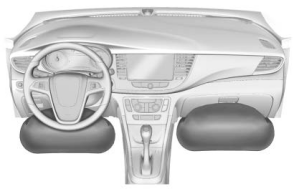
Where Are the Airbags?
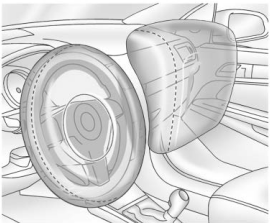
The driver frontal airbag is in the center of the steering wheel.
The front outboard passenger frontal airbag is in the passenger side instrument panel.

Copyright © 2026 www.buencore.com