
Buick Encore: Phone / Bluetooth (Pairing and Using the Phone for 8 Inch Screen)
Buick Encore 2020-2024 Owner's Manual / Infotainment System / Phone / Bluetooth (Pairing and Using the Phone for 8 Inch Screen)
- Pairing
- Switching to Handset or Handsfree Mode
- Making a Call Using Contacts and Recent Calls
- Accepting or Declining a Call
- Call Waiting
- Three-Way Calling
- Ending a Call
- Dual Tone Multi-Frequency (DTMF) Tones
- Voice Mail
 Bluetooth (Overview for 8 Inch Screen)
The Bluetooth-capable system can interact
with many cell phones, allowing:
Placement and receipt of calls in a
hands-free mode.
Sharing of the cell phone’s address book
or contact list with the vehicle...
 Pairing
A Bluetooth-enabled cell phone must be
paired to the Bluetooth system and then
connected to the vehicle before it can be
used. See the cell phone manufacturer's user
guide for Bluetooth functions before pairing
the cell phone...
Other information:
Buick Encore 2020-2024 Owner's Manual: Remote Vehicle Start
The vehicle may have this feature that allows you to start the engine from outside the vehicle. : This button will be on the RKE transmitter if the vehicle has remote start. The climate control system will use the previous settings during a remote start...
Buick Encore 2020-2024 Owner's Manual: OnStar
If the vehicle is equipped with OnStar and has an active service plan, additional data may be collected and transmitted through the OnStar system. This includes information about the vehicle’s operation; collisions involving the vehicle; the use of the vehicle and its features, including infotainment; and the location and approximate GPS speed of the vehicle...
Categories
- Manuals Home
- Buick Encore Owners Manual
- Buick Encore Service Manual
- Passenger Sensing System
- Safety Locks
- Manual Mode
- New on site
- Most important about car
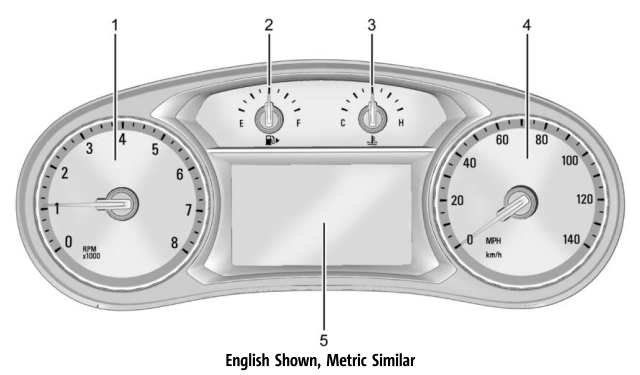
Instrument Cluster

Copyright © 2024 www.buencore.com