
Buick Encore: Climate Controls
Buick Encore 2020-2026 Owner's Manual / Climate Controls
 Settings
Settings (7 Inch Screen)
The settings menu may be organized into
three categories.
Select the desired category by touching
System, Apps, or Vehicle.
To access the menus:
Touch the Settings icon on the Home
Page on the infotainment display...
 Climate Control Systems
The heating, cooling, defrosting, and ventilation for the vehicle can be
controlled with this
system.
Temperature Control
Air Delivery Modes
Fan Control
Defrost
Rear Window Defogger
Air Conditioning
Recirculation
The following are climate control settings
that use more fuel:
Defrost mode
Extreme temperature settings
High fan speed settings
To help reduce fuel usage:
Select a temperature setting that is
higher in hot weather and lower in cold
weather...
Other information:
Buick Encore 2020-2026 Owner's Manual: Programming Transmitters to the Vehicle
Only RKE transmitters programmed to the vehicle will work. If a transmitter is lost or stolen, a replacement can be purchased and programmed through your dealer. The vehicle can be reprogrammed so that lost or stolen transmitters no longer work. Any remaining transmitters will need to be reprogrammed...
Buick Encore 2020-2026 Owner's Manual: Headlamps, Front Turn Signal and Parking Lamps
Headlamp Assembly The vehicle has halogen high-beam and low-beam headlamps, an LED turn signal lamp, Daytime Running Lamps (DRL), and a sidemarker lamp on the headlamp assembly. High-Beam Headlamp Low-Beam Headlamp High-Beam Headlamp/Low-Beam Headlamp Open the hood...
Categories
- Manuals Home
- Buick Encore Owners Manual
- Buick Encore Service Manual
- Cooling System
- Fuel Gauge
- Manual Mode
- New on site
- Most important about car
Lap-Shoulder Belt
All seating positions in the vehicle have a lap-shoulder belt.
The following instructions explain how to wear a lap-shoulder belt properly.
Adjust the seat, if the seat is adjustable, so you can sit up straight. To see how, see “Seats” in the Index.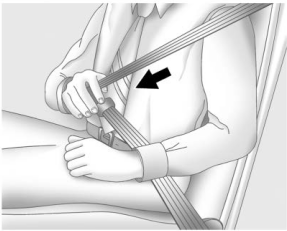

Copyright © 2026 www.buencore.com