Buick Encore: Controls / Windshield Wiper/Washer
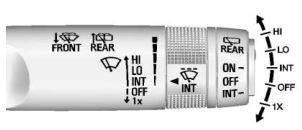
The windshield wiper/washer lever is on the right side of the steering column.
Move the lever to one of the following positions:
HI : Use for fast wipes.
LO : Use for slow wipes.
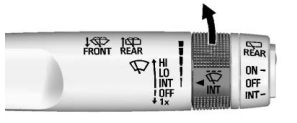
INT : Use this setting for intermittent wipes
or Rainsense™, if equipped. For intermittent
wipes, move the windshield wiper lever to
INT. Turn the  INT band up for more
frequent wipes or down for less frequent
wipes.
INT band up for more
frequent wipes or down for less frequent
wipes.
If equipped with Rainsense wipes, see “Rainsense” later in this section.
OFF : Use to turn the wipers off.
1X : For a single wipe, briefly move the wiper lever down. For several wipes, hold the wiper lever down.
 : Pull the windshield wiper
lever toward
you to spray windshield washer fluid and
activate the wipers. The wipers will continue
until the lever is released or the maximum
wash time is reached. When the windshield
wiper lever is released, additional wipes may
occur depending on how long the windshield
: Pull the windshield wiper
lever toward
you to spray windshield washer fluid and
activate the wipers. The wipers will continue
until the lever is released or the maximum
wash time is reached. When the windshield
wiper lever is released, additional wipes may
occur depending on how long the windshield
washer had been activated. See Washer Fluid for information on filling the windshield washer fluid reservoir.
 Steering Wheel Controls and Horn
Steering Wheel Controls
The infotainment system can be operated
by using the steering wheel controls.
Horn
Press a on the steering wheel
pad to
sound the horn...
 Wipe Parking
If the ignition is turned off while the wipers
are on LO, HI, or INT, they will
immediately stop.
If the windshield wiper lever is then moved
to OFF before the driver door is opened or
within 10 minutes, the wipers will restart
and move to the base of the windshield...
Other information:
Buick Encore 2020-2026 Owner's Manual: Bluetooth (Voice Recognition for 8 Inch Screen)
Using Bluetooth Voice Recognition To use voice recognition, press g on the steering wheel controls. Use the commands below for the various voice features. For additional information, say “Help” while in a voice recognition menu. See Voice Recognition (8 Inch Screen) for help using voice recognition commands...
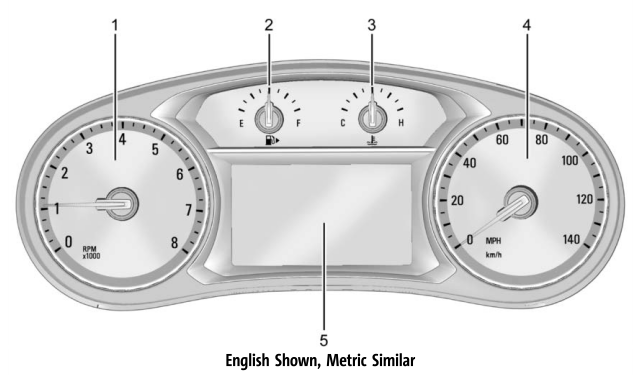
Buick Encore 2020-2026 Owner's Manual: Speedometer, Odometer, Trip Odometer and Tachometer
Speedometer The speedometer shows the vehicle speed in kilometers per hour (km/h) and miles per hour (mph). Odometer The odometer shows how far the vehicle has been driven, in either kilometers or miles. Trip Odometer The trip odometer shows how far the vehicle has been driven since the trip odometer was last reset...
Categories
- Manuals Home
- Buick Encore Owners Manual
- Buick Encore Service Manual
- Engine Heater
- Tire Changing
- Engine Overheating
- New on site
- Most important about car
Instrument Cluster