
Buick Encore: Exterior Lighting / Turn and Lane-Change Signals
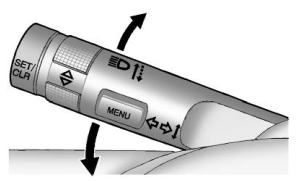
Move the lever all the way up or down to signal a turn.
An arrow on the instrument cluster will flash in the direction of the turn or lane change.
Raise or lower the lever until the arrow starts to flash to signal a lane change. The turn signal flashes three times.
The lever returns to its starting position when it is released.
If after signaling a turn or lane change the arrow flashes rapidly or does not come on, a signal bulb may be burned out. Replace any burned out bulbs. If a bulb is not burned out, check the fuse. See Fuses and Circuit Breakers.
 Hazard Warning Flashers
: Press and momentarily hold to
make
the front and rear turn signal lamps flash on
and off. This warns others that you are
having trouble. Press and momentarily hold
again to turn the flashers off...

Other information:
Buick Encore 2020-2026 Owner's Manual: Radio Reception
Unplug electronic devices from the accessory power outlets if there is interference or static in the radio. FM FM signals only reach about 16 to 65 km (10 to 40 mi). Although the radio has a built-in electronic circuit that automatically works to reduce interference, some static can occur, especially around tall buildings or hills, causing the sound to fade in and out...
Buick Encore 2020-2026 Owner's Manual: Connections
The following services help with staying connected. For coverage maps, see www.onstar.com (U.S.) or www.onstar.ca (Canada). Ensuring Security Change the default passwords for the Wi-Fi hotspot and myBuick mobile application. Make these passwords different from each other and use a combination of letters and numbers to increase the security...
Categories
- Manuals Home
- Buick Encore Owners Manual
- Buick Encore Service Manual
- Lower Anchors and Tethers for Children (LATCH System)
- Jump Starting
- Maintenance Schedule
- New on site
- Most important about car
Where Are the Airbags?
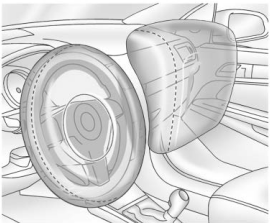
The driver frontal airbag is in the center of the steering wheel.
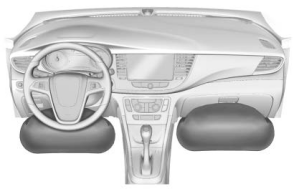
The front outboard passenger frontal airbag is in the passenger side instrument panel.

Copyright © 2026 www.buencore.com