
Buick Encore: Overview (7 Inch Screen) / Home Page
The Home Page is where vehicle application icons are accessed. Some applications are disabled when the vehicle is moving.
Swipe left or right across the display to access the pages of icons.
Managing Home Page Icons
- Touch and hold any of the Home Page icons to enter edit mode.
- Continue holding the icon and drag it to the desired position.
- Release your finger to drop the icon in the desired position.
- To move an application to another page, drag the icon to the edge of the display toward the desired page.
- Continue dragging and dropping application icons as desired.
 Infotainment System
The infotainment system is controlled by using the infotainment display, the
controls on the
center stack, steering wheel controls. Below is the 7 inch screen controls image
and overview...
 Steering Wheel Controls
If equipped, some audio controls can be
adjusted at the steering wheel.
: For vehicles with Bluetooth,
press
to interact with those systems.
: Press to decline an incoming
call,
to end speech recognition, or to end a
current call...
Other information:
Buick Encore 2020-2026 Owner's Manual: Service
All vehicles have a label underhood that identifies the refrigerant used in the vehicle. The refrigerant system should only be serviced by trained and certified technicians. The air conditioning evaporator should never be repaired or replaced by one from a salvage vehicle...
Buick Encore 2020-2026 Owner's Manual: Using the System
Infotainment Display Icons Infotainment display icons show when available. When a function is unavailable, the icon may gray out. When a function is selected, the icon may highlight. Audio Touch the Audio icon to display the active audio source page...
Categories
- Manuals Home
- Buick Encore Owners Manual
- Buick Encore Service Manual
- Power Outlets
- Engine Overheating
- Engine Compartment Overview
- New on site
- Most important about car
Vehicle Alarm System
If equipped with an anti-theft alarm system, the indicator light, on the instrument panel near the windshield, shows the status of the system.
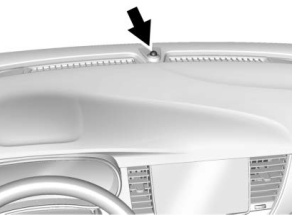
Off : Alarm system is disarmed.
On Solid : Vehicle is secured during the delay to arm the system.
Fast Flast : Vehicle is unsecured. A door, the liftgate, or the hood is open.

Copyright © 2026 www.buencore.com