
Buick Encore: Warning Lights, Gauges, and Indicators / Lane Departure Warning (LDW) Light and Vehicle Ahead Indicator
Buick Encore 2020-2026 Owner's Manual / Instruments and Controls / Warning Lights, Gauges, and Indicators / Lane Departure Warning (LDW) Light and Vehicle Ahead Indicator
Lane Departure Warning (LDW) Light
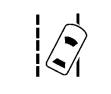
This light is green if LDW is on and ready to operate.
This light changes to amber and flashes to indicate that the lane marking has been crossed without using a turn signal in that direction.
See Lane Departure Warning (LDW).
Vehicle Ahead Indicator

If equipped, this indicator will display green when a vehicle is detected ahead.
See Forward Collision Alert (FCA) System.
 Antilock Brake System (ABS) Warning Light
This warning light should come on briefly
when the vehicle is turned on. If the light
does not come on, have it fixed so it will be
ready to warn if there is a problem...
 Traction Off Light
This light comes on briefly while starting
the engine. If it does not, have the vehicle
serviced by your dealer. If the system is
working normally, the indicator light then
turns off...
Other information:
Buick Encore 2020-2026 Owner's Manual: Seat Belt Extender and Safety System Check
Seat Belt Extender If the vehicle's seat belt will fasten around you, you should use it. But if a seat belt is not long enough, your dealer will order you an extender. When you go in to order it, take the heaviest coat you will wear, so the extender will be long enough for you...
Buick Encore 2020-2026 Owner's Manual: Traction Off Light
This light comes on briefly while starting the engine. If it does not, have the vehicle serviced by your dealer. If the system is working normally, the indicator light then turns off. The traction off light comes on when the Traction Control System (TCS) has been turned off by pressing and releasing the TCS/StabiliTrak/ESC button...
Categories
- Manuals Home
- Buick Encore Owners Manual
- Buick Encore Service Manual
- Vehicle Alarm System
- Instrument Panel Fuse Block
- Cooling System
- New on site
- Most important about car
Steering Wheel Adjustment
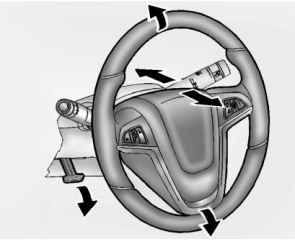
To adjust the steering wheel:
Pull the lever down. Move the steering wheel up or down. Pull or push the steering wheel closer or away from you. Lift the lever up to lock the steering wheel in place.
Copyright © 2026 www.buencore.com