
Buick Encore: Appearance Care / Floor Mats
Warning
If a floor mat is the wrong size or is not properly installed, it can interfere with the pedals. Interference with the pedals can cause unintended acceleration and/or increased stopping distance which can cause a crash and injury. Make sure the floor mat does not interfere with the pedals.
Use the following guidelines for proper floor mat usage.
- The original equipment floor mats were designed for your vehicle. If the floor mats need replacing, it is recommended that GM certified floor mats be purchased. Non-GM floor mats may not fit properly and may interfere with the accelerator or brake pedal. Always check that the floor mats do not interfere with the pedals.
- Do not use a floor mat if the vehicle is not equipped with a floor mat retainer on the driver side floor.
- Use the floor mat with the correct side up. Do not turn it over.
- Do not place anything on top of the driver side floor mat.
- Use only a single floor mat on the driver side.
- Do not place one floor mat on top of another.
The driver side floor mat is held in place by a button-type retainer.
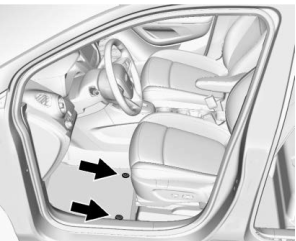
Removing and Replacing the Floor Mats
- Pull up on the rear of the floor mat to unlock the retainers and remove.
- Reinstall by lining up the floor mat retainer openings over the carpet retainers and snap into position.
- Make sure the floor mat is properly secured in place. Verify the floor mat does not interfere with the pedals.
Cleaning Rubber Floor Mats (All-Weather Mats and Floor Liners)
Warning
Do not use cleaners that contain silicone, wax-based products, or cleaners that increase gloss on rubber floor mats/liners. These cleaners can permanently change the appearance and feel of the rubber and can make the floor mats/liners slippery. Your foot could slip while operating the vehicle, and you could lose control, resulting in a crash. You or others could be injured.
Use a soft cloth and/or a brush dampened with water to remove dust and loose dirt. For more thorough cleaning, use a mild soap solution.
 Interior Care
To prevent dirt particle abrasions, regularly
clean the vehicle's interior. Immediately
remove any soils. Newspapers or dark
garments can transfer color to the vehicle’s
interior...

Other information:
Buick Encore 2020-2026 Owner's Manual: Top Tier Fuel
GM recommends the use of TOP TIER Detergent Gasoline to keep the engine clean, reduce engine deposits, and maintain optimal vehicle performance. Look for the TOP TIER Logo or see www.toptiergas.com for a list of TOP TIER Detergent Gasoline marketers and applicable countries...
Buick Encore 2020-2026 Owner's Manual: Remote Keyless Entry (RKE) System
See Radio Frequency Statement. If there is a decrease in the Remote Keyless Entry (RKE) operating range: Check the distance. The transmitter may be too far from the vehicle. Check the location. Other vehicles or objects may be blocking the signal...
Categories
- Manuals Home
- Buick Encore Owners Manual
- Buick Encore Service Manual
- Malfunction Indicator Lamp (Check Engine Light)
- Engine Compartment Overview
- Jump Starting
- New on site
- Most important about car
Steering Wheel Adjustment
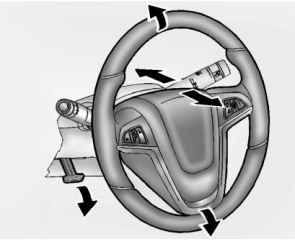
To adjust the steering wheel:
Pull the lever down. Move the steering wheel up or down. Pull or push the steering wheel closer or away from you. Lift the lever up to lock the steering wheel in place.