Buick Encore: Warning Lights, Gauges, and Indicators / Cluster Menu
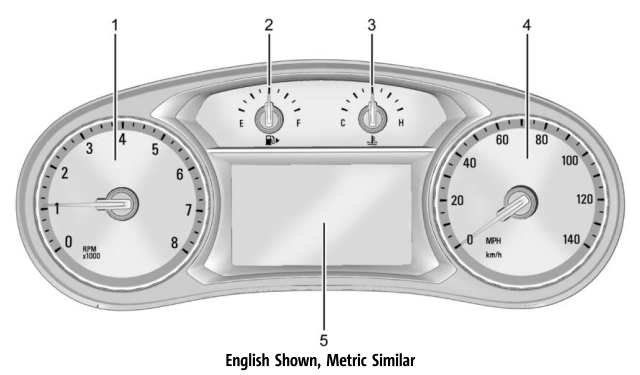
There is an interactive display area in the center of the instrument cluster.
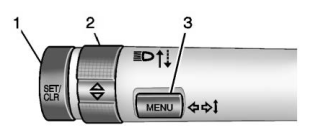
Use the controls to open and scroll through the different items and displays.
SET/CLR : Press to set or clear the menu item when it is displayed.
 : Turn the band to scroll through
the
menu items.
: Turn the band to scroll through
the
menu items.
MENU: Press to access the cluster applications. This button is also used to return to or exit the last screen displayed on the DIC.
Press MENU to access the cluster
applications. Use  to scroll through
the
list of available applications. Not all
applications will be available on all vehicles.
to scroll through
the
list of available applications. Not all
applications will be available on all vehicles.
- Info app. This is where you can view the selected Driver Information Center (DIC) displays. See Driver Information Center (DIC).
- Navigation
- Options
Navigation
Press SET/CLR to select the Navigation app.
Use  to highlight available
options.
If there is no active route, you can resume
the last route and turn the voice prompts
on/off. If there is an active route, press SET/
CLR to cancel route guidance or turn the
voice prompts on/off.
to highlight available
options.
If there is no active route, you can resume
the last route and turn the voice prompts
on/off. If there is an active route, press SET/
CLR to cancel route guidance or turn the
voice prompts on/off.
Options
Press SET/CLR to select the Options app. Use
 to scroll through the items in the
Options menu.
to scroll through the items in the
Options menu.
Unit : Press SET/CLR while Unit is displayed to enter the Units menu. Choose U.S. or metric units by pressing SET/CLR while the desired item is highlighted.
Info Pages : Press SET/CLR while Info Pages is displayed to enter the Info Pages menu. Press SET/CLR to edit the list of info apps displayed. See Driver Information Center (DIC).

 Speedometer, Odometer, Trip Odometer and Tachometer
Speedometer
The speedometer shows the vehicle speed in
kilometers per hour (km/h) and miles per
hour (mph).
Odometer
The odometer shows how far the vehicle has
been driven, in either kilometers or miles...
Other information:
Buick Encore 2020-2026 Owner's Manual: Vehicle Messages
Messages displayed on the DIC indicate the status of the vehicle or some action that may be needed to correct a condition. Multiple messages may appear one after another. The messages that do not require immediate action can be acknowledged and cleared by pressing SET/CLR...
Buick Encore 2020-2026 Owner's Manual: Battery Power Protection and Exterior Lighting Battery Saver
Battery Power Protection The battery saver feature protects against draining the vehicle's battery. If some interior lamps or the manual parking lamps or headlamps are left on and the ignition is turned off, the battery rundown protection system automatically turns the lamp off after some time...
Categories
- Manuals Home
- Buick Encore Owners Manual
- Buick Encore Service Manual
- Prohibited Fuels
- Digital Speedometer
- Engine Overheating
- New on site
- Most important about car
Instrument Cluster